If Control Tower stops partway through landing zone setup with the error below, make any change to the billing details on your organisation's management account and retry the setup. That's what fixed it for me.
AWS Control Tower failed to set up your landing zone completely: AWS Control Tower setup failed. Be sure your account is subscribed to the AWS EC2 service, then try again. If this error persists, contact AWS Support.
I first wrote this up in January 2023 as a short note, and I've since expanded it with what AWS documents and what other people found when they hit the same error.
What happened#
I was standing up Control Tower in a personal account, and setup failed partway through with that message. The account was already subscribed to EC2, so the message made no sense. After a fair bit of digging I couldn't find an official resolution from AWS, and the Control Tower troubleshooting guide still doesn't list this error.
What fixed it was updating the billing information on the management account. I changed the billing address on the active card, saved it, and changed it straight back. As far as I can tell it doesn't matter what you change, only that you touch the card's details so AWS re-validates them. The next setup attempt completed without complaint.
Why the message points at the wrong account#
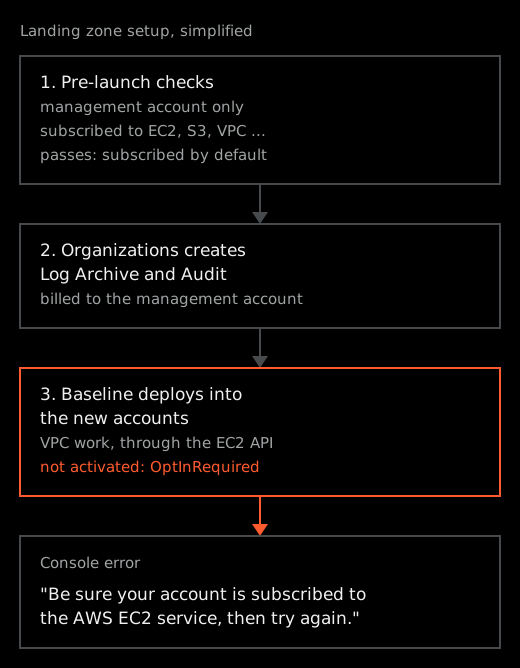
Before it builds anything, Control Tower runs automated pre-launch checks against the management account. It checks that service quotas are high enough and that the account is subscribed to ten services, EC2, S3, VPC, CloudFormation, CloudTrail and Config among them. The same page notes that every account is subscribed to these by default, so a normal management account passes.
Then Control Tower creates two shared accounts through AWS Organizations, Log Archive and Audit, and the management account pays for everything in the landing zone. It creates the AWSControlTowerExecution role in both accounts and deploys its baseline into them, and that baseline includes VPC work, which goes through the EC2 API.
The reports I've found all point at those two new accounts. In the accepted answer on re:Post, the person opened services in Audit and Log Archive and got an activation screen. The author of a second answer on the same thread saw it too, after switching into them with AWSControlTowerExecution. In a write-up from Cevo, AWS Support confirmed that EC2 hadn't been activated in the Audit account.
So my reading is that the account failing the EC2 check isn't the one you're signed in to. It's one of the accounts Control Tower just created, and it isn't activated yet. In both re:Post answers the cause was the payment method on the management account. In the Cevo case the card had already been verified, and support had to activate EC2 on their side. AWS doesn't document any of this, but it fits the EC2 OptInRequired error, which says a new account "might take some time to be activated while your credit card details are being verified".
Diagnose it from the CLI#
Run these with credentials for the management account.
Start with the account list. AWS Organizations added a State field in September 2025, because the older Status field could show ACTIVE for accounts that weren't ready to use. PENDING_ACTIVATION means sign-up was never completed, for example phone verification or payment information. You need AWS CLI 2.29.0 or later to see it.
aws organizations list-accounts \
  --query 'Accounts[].[Name,Id,State]' \
  --output table
If Log Archive or Audit shows PENDING_ACTIVATION, you've found it. I haven't been able to confirm that an account in this exact situation reports that state, though, so test EC2 directly as well.
To do that, add a profile for each new account to ~/.aws/config that assumes the role Control Tower created. This is a simplified example. Replace the account ID with the one from the list, and management with your own profile for the management account.
cat >> ~/.aws/config <<'EOF'
[profile log-archive]
role_arn = arn:aws:iam::111122223333:role/AWSControlTowerExecution
source_profile = management
EOF
Then call EC2 in your home Region:
aws ec2 describe-availability-zones \
  --region us-east-1 \
  --profile log-archive
A healthy account returns its Availability Zones. An account that isn't activated fails with OptInRequired or PendingVerification, two of the common errors any EC2 API action can return. Add a profile for Audit and repeat, then run it once without --profile to compare against the management account.
If you'd rather use the console, switch role into each account with AWSControlTowerExecution and open EC2. A page asking you to complete sign-up, instead of the EC2 dashboard, tells you the same thing.
The fix that worked for me#
Sign in to the management account and open the Billing and Cost Management console. Choose Payment preferences, select the active card, choose Edit, change something such as the address, and save. AWS's guide to updating a credit card has the same steps. Then retry the landing zone setup from the Control Tower console.
I'm not the only one this worked for. In the accepted re:Post answer, AWS account activation support told the person to make "any change to the payment method, like a simple dot in the address line", and that got both the Audit and Log Archive accounts activated. A Stack Overflow answer describes the same dot in the address line.
If that doesn't work#
Check the card on Payment preferences first. If it's marked unverified, AWS's unverified card steps say to choose Verify and, if that fails, delete the card and add it again. Your bank might ask for its own verification on top.
If the management account is brand new, check your email and give it time. The troubleshooting guide says that a management account less than an hour old can hit problems when the extra accounts are created. It suggests looking for a confirmation email that's waiting for a response, or waiting an hour before you retry.
After that, open a support case about account activation. Every account gets one-on-one responses to account and billing questions on the free Basic plan. Ask them to re-validate the payment method on the management account. In the second answer on the re:Post thread, editing the billing address didn't help. Support then found the payer account's payment method invalid and sent an authorisation charge to the card issuer, and once that was approved the retry worked.
Two things made it worse in the Cevo case, and I'd avoid both:
- Don't close Log Archive and Audit to start over. The author called it the wrong thing to do in hindsight, because the landing zone was still looking for those accounts. They had to be reinstated, and only the root user of each account can request that.
- Clean up anything you create in Log Archive or Audit while you test. Launching a couple of EC2 instances for half an hour is a suggestion on re:Post, and it didn't fix the error for the person who reported trying it. At Cevo, a VPC and instance left in the Audit account caused the next failure, "AWS Control Tower could not baseline VPC in the enrolled account because of existing resource dependencies". Deleting them let the retry succeed.
If you've landed here from searching the exact error string, try the billing change before you open a support case. It saved me a good chunk of time and frustration.